Free for your first 10 beds, foreverNo card to startSet up in 10 minutes
$
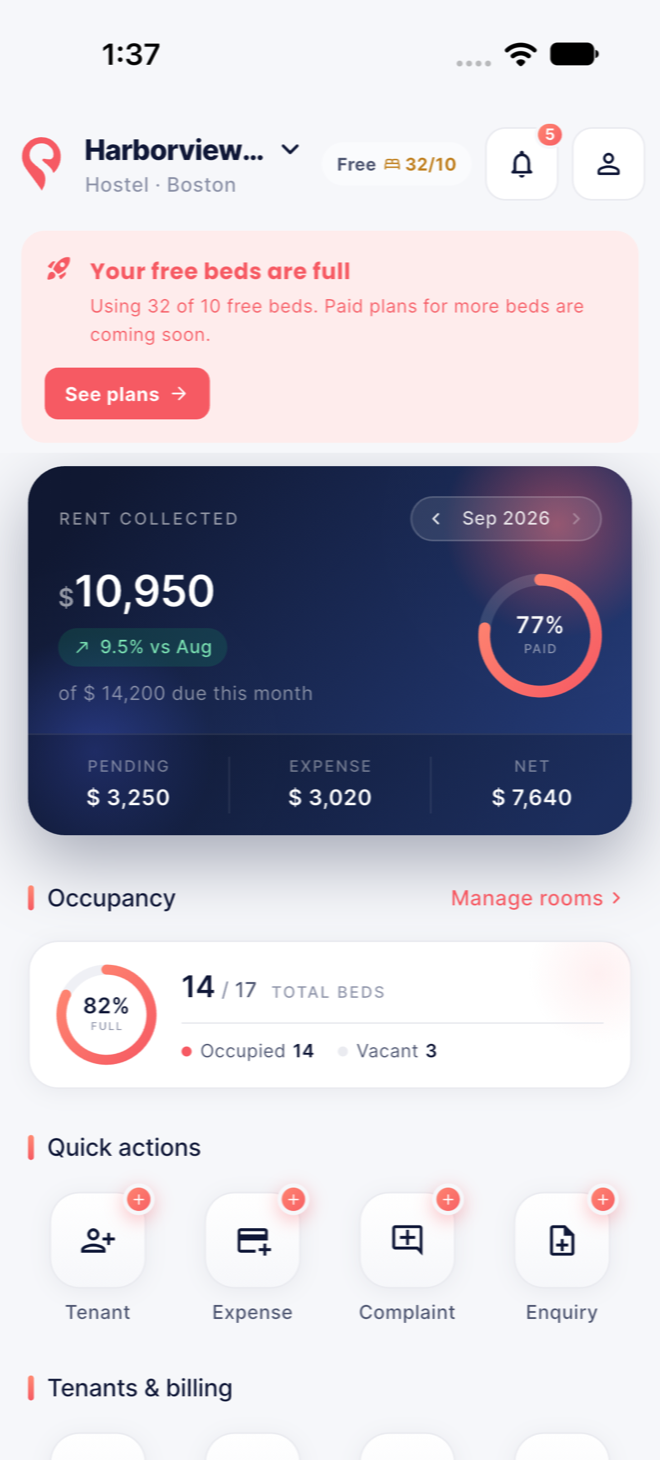
Rent collected · 100%Aug 2026 · 0 pending
⚡
Rent sent for confirmation · $850Confirm in one tap
✓
Complaint resolvedRoom 102 · Wi-Fi · 2h 10m
Built forHostelsStudent housingCo-livingRooming housesRent-by-the-room homesMulti-property operators
Everything, in one place
All the work of a building. None of the paperwork.
Paper ledgers, spreadsheets and group texts got you this far. Dormingo replaces all of them with one app your whole team — and your tenants — actually use.
10 bedsfree forever, no card needed
0% cutof your rent — it goes straight to you
1 tapfrom payment to branded receipt
10 minto set up your first property
Live dashboard
Rent collected, pending, expenses and net for the month, plus occupancy — the whole building on one calm screen.
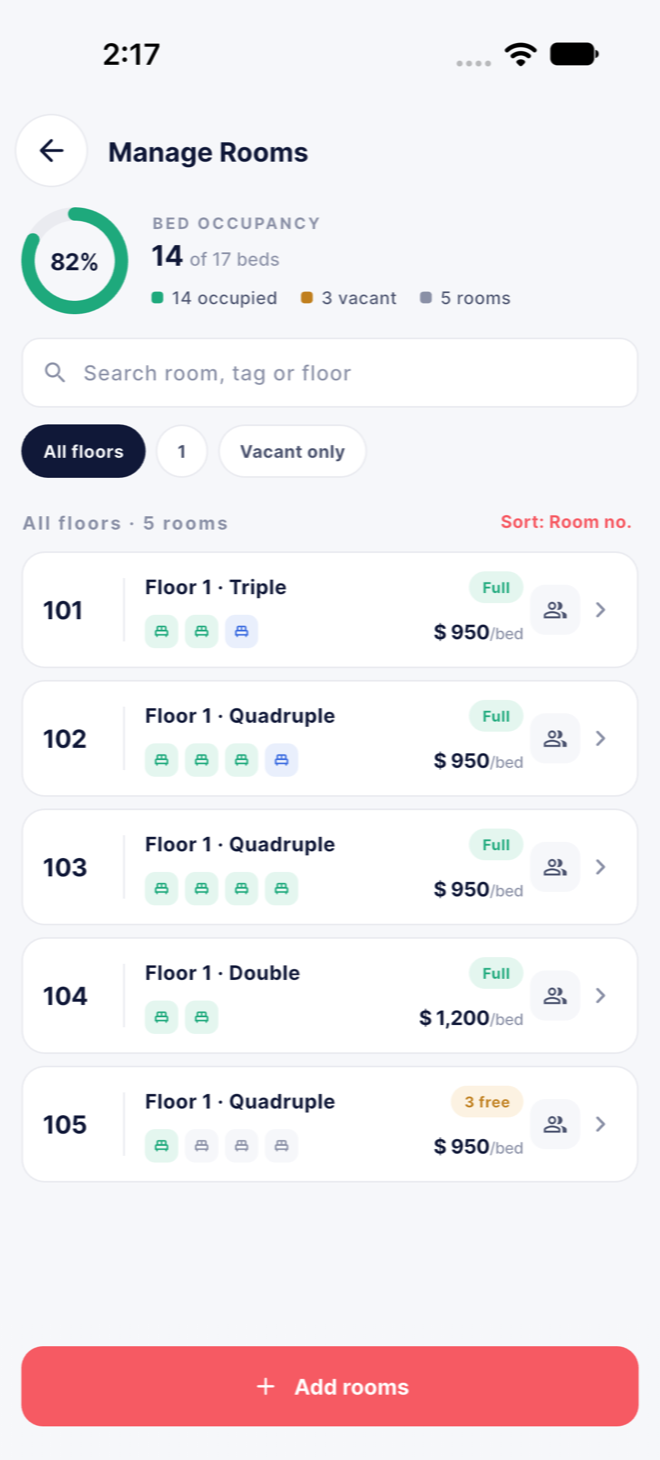
Rooms, floors & beds
Floors, rooms, sharing type and rent per bed. Vacant and occupied at a glance; move or swap tenants between beds.
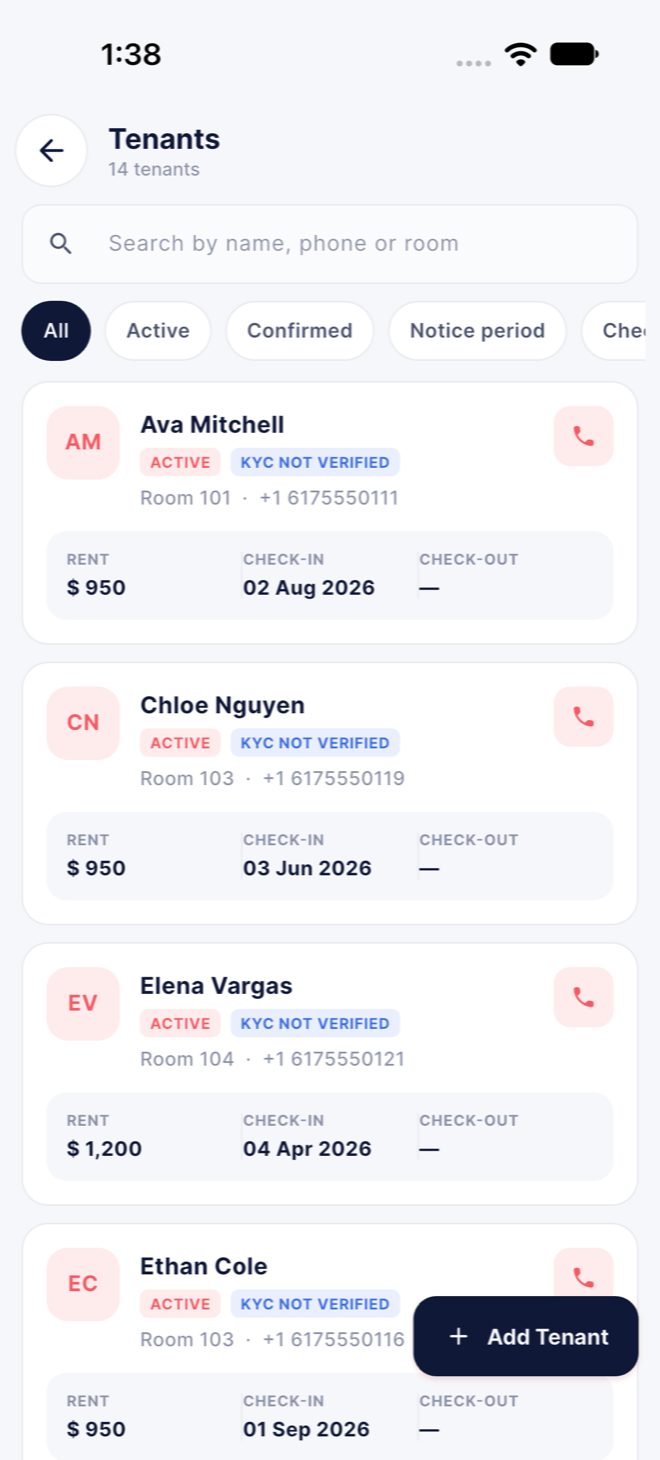
Tenant records
Profile, joining and vacating dates, rent cycle, lock-in, notice, transfers, study or work details, guardian and emergency contact.
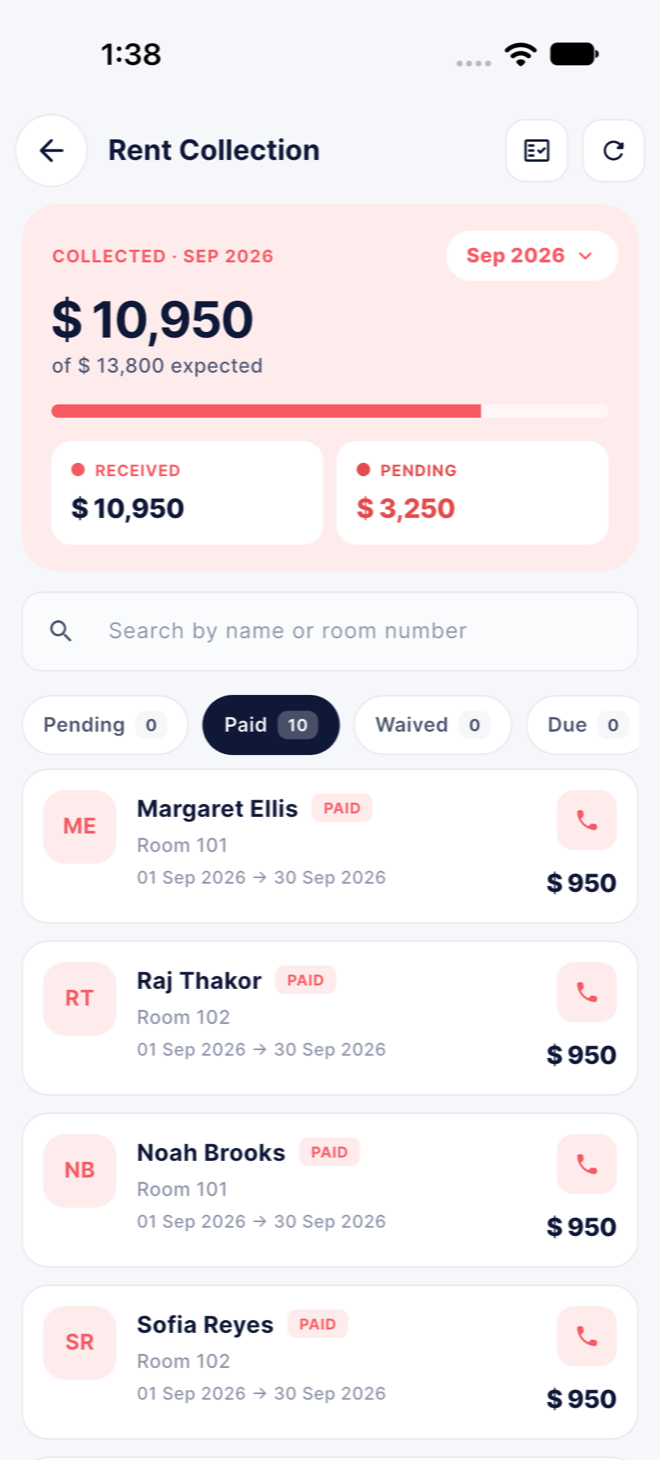
Rent collection
Pending, paid, waived and overdue split by month. Part payments, late-fee rules, reminders and a receipt with one tap.
Payment confirmation
Tenants pay you directly, then send the payment with proof from their app. You confirm in one tap, the month is marked paid and the receipt goes out.
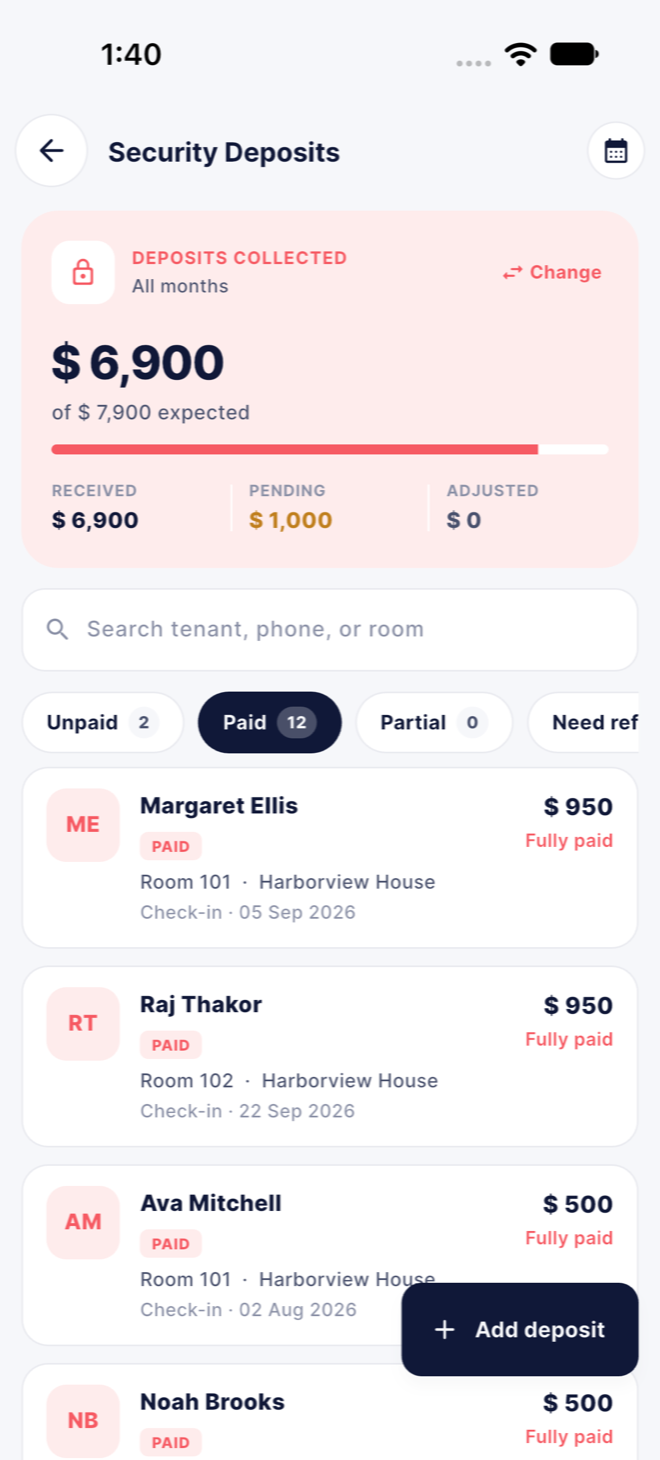
Security deposits
Held, retained and refunded — with a refund timeline your tenant can follow from their own app.
Refunds, tokens & forfeitures
Booking tokens, advances, refunds and forfeits, each on the ledger with who recorded it and when.
Electricity & utilities
Meter readings per room, units and rate, bills split across the room's tenants and added to their dues.
Expenses & reports
Categorised spending, monthly net, financial reports and exports your accountant will thank you for.
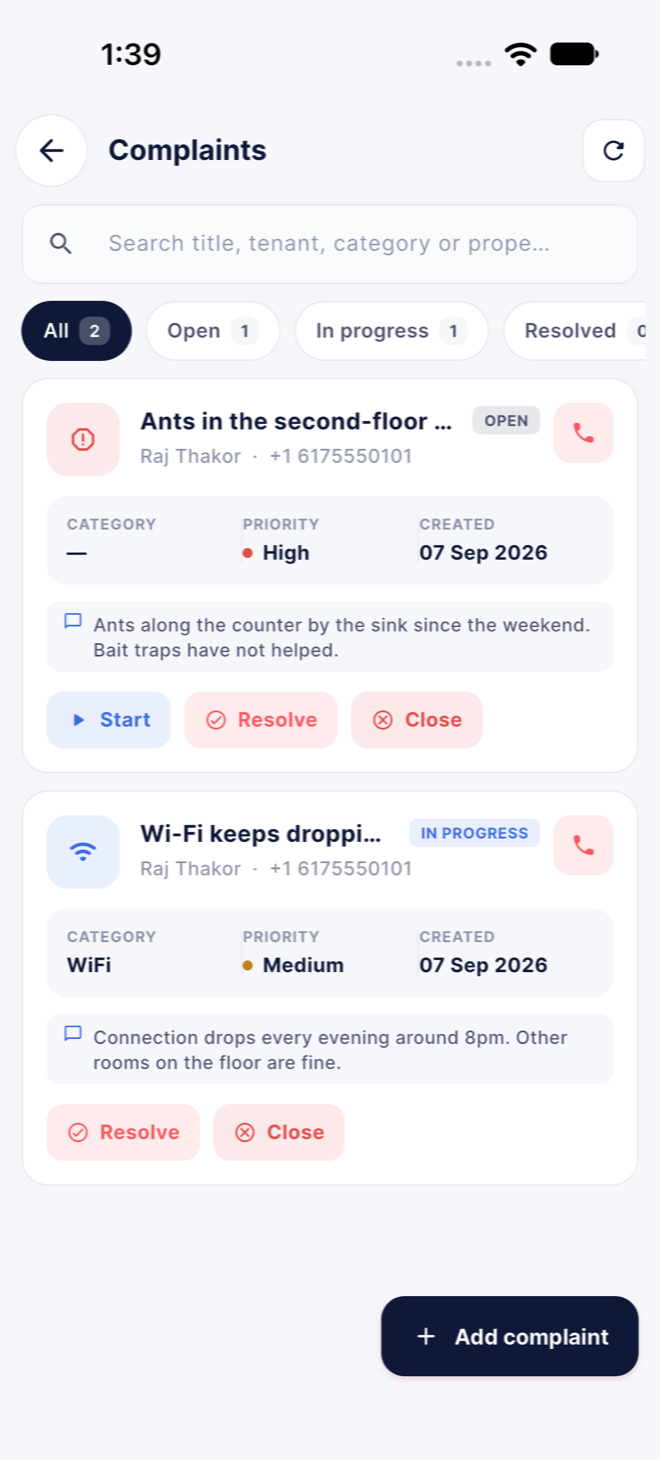
Complaints & repairs
Category, priority and photos, video or voice note. Assign, track a timeline, chat with the tenant and collect a rating on close.
Enquiries & visits
Capture every lead, schedule visits, follow up, and convert to a tenant in one tap when they say yes.
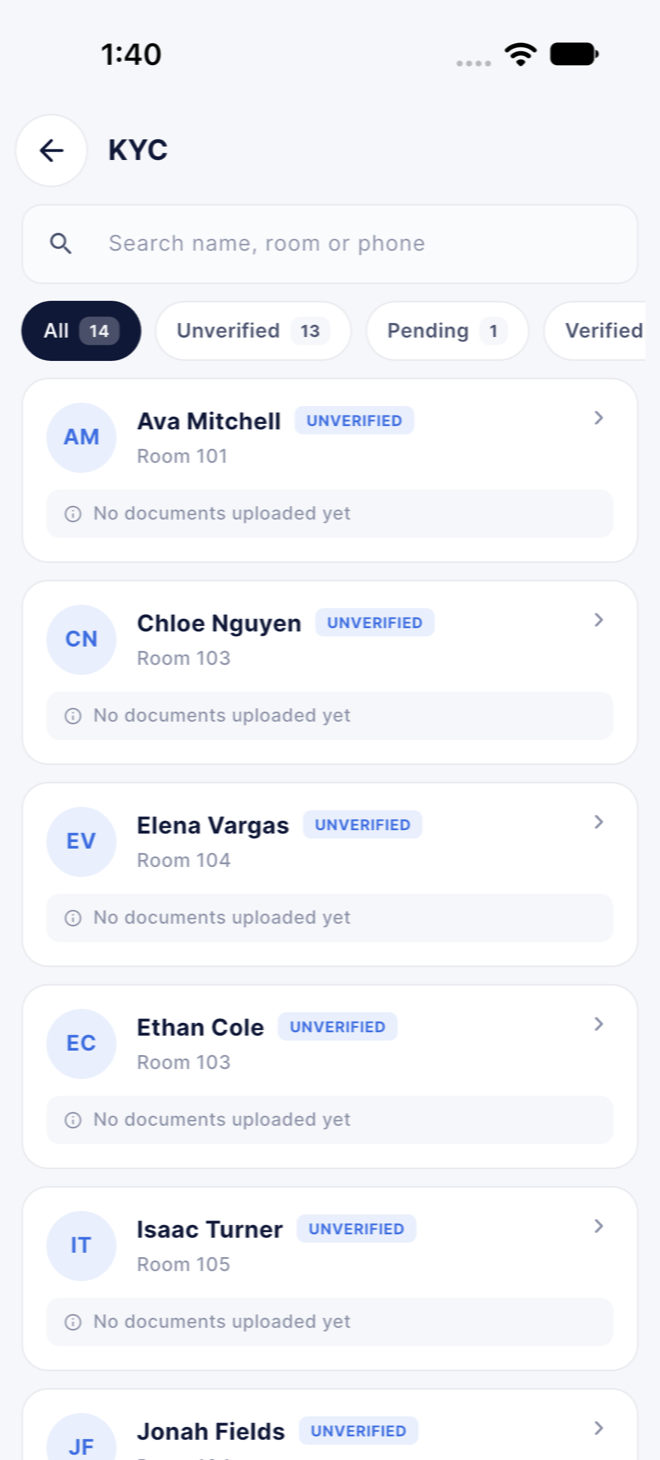
ID & documents
Scan an ID front and back on the device, verify, track expiry. Only the last four digits of the number are stored.
Managers & permissions
Invite staff, give each exactly the permissions they need, restrict them to their properties. Owners approve every join.
Notices & house rules
Publish a notice, timings or house rules once and every tenant sees it in their app, with a push.
Receipts & invoices
Branded PDF receipts with your logo, tax ID and payment details, shareable by text or email in a tap.
Notifications
Push alerts for payments, reported payments, complaints, documents and bookings — for you, your staff and your tenants.
Rent
Rent collected, never chased.
See who has paid, who hasn't and who is about to be late — by month, by room, by tenant — and nudge them without a single phone call.
Pending, paid, waived and overdue tabs, with search by name or room
Part payments, tokens and advances handled without side calculations
Automatic reminders to tenants: 3 days before, on the day, weekly when late
Every payment issues a branded receipt and lands on the ledger with a name and a time
Rooms & beds
See every bed, from anywhere.
Set up floors, rooms and sharing once. From then on, occupancy is a number you know, not a walk you take.
Rent per bed, deposit, amenities and photos per room
Vacant, occupied and notice-period beds at a glance
Move a tenant between beds without touching their ledger
Start with 10 free beds — paid beds, priced one at a time, are opening soon
Tenants
Know every tenant, enquiry to move-out.
One record from the first phone call to the last deposit refund, with everything a background check or a parent could ask for.
Stay dates, rent cycle, lock-in and notice with dues computed for you
Guardian and emergency contacts, college or employer details
ID documents scanned on the phone and verified in seconds
Give the tenant app access in one tap and share the login by text
Complaints
Repairs that don't get lost in group texts.
Tenants raise it with a photo, a video or a voice note. Your team gets a priority, a due time and a timeline. Everyone sees the same thing.
Categories and priorities with a resolution target for each
Assign to a manager, update status, chat with the tenant in-thread
Tenant rates the fix; reopen if it comes back
Push to staff on new complaints, push to tenants on every update
Deposits & money
Deposits that reconcile themselves.
Every dollar in and out — deposits, refunds, forfeits, tokens, electricity, expenses — on an append-only ledger you can trust at tax time.
Deposit held, deductions itemised, refund with a timeline the tenant can see
Electricity per room from meter readings, split fairly across tenants
Expenses by category with monthly net on the dashboard
Financial reports and exports for your accountant
ID documents
ID checks in seconds, not folders.
Scan a driver's license, state ID, passport or student ID on the phone. The scanner straightens the page on-device; nothing biometric, nothing sent anywhere it shouldn't go.
Front and back, expiry date and verification status per document
Only the last four digits stored alongside the image
Tenants can upload from their own app; you verify from yours
Only staff with the documents permission can open one
Tenant app · included on every plan
Your tenants get an app too. Same download, their own view.
Turn on app access from a tenant's page and share the login by text. They see their stay, pay rent, raise complaints and keep their documents — and you stop answering the same three questions every month.
Home
Rent health at a glance — paid, due, due soon or overdue with a countdown — plus notices, deposit and quick actions.
Payments
See what is due, pay the property and send the payment with proof for confirmation. Edit it until it is confirmed. History, receipts as PDF, deposit timeline.
Help
Raise a complaint with photos, video or a voice note. Follow the timeline, chat with the property, reopen, rate.
Documents
Upload ID for verification. A vault with agreement terms, receipts, deposit receipt, house rules and notices.
My stay
Room, bed, rent and dates, property photos and amenities, timings, house rules, and a call button for the owner.
No invite links. No separate app. Access can be removed the day they move out.Get Dormingo
Payments
Rent goes straight to you. Dormingo never touches it.
Tenants pay you the way they already do — bank transfer, Zelle, check or cash. Dormingo keeps both sides honest: every payment is either marked paid by you, or sent by the tenant with proof and confirmed by you.
1
Tenant pays and sends proof
Their dues are already filled in. They pay you directly, then send the payment for confirmation with the reference or a screenshot. The month shows "Awaiting confirmation".
2
You get a notification
See who paid, for which month, how and with what proof. If the tenant corrects a detail before you confirm, you are told that too.
3
Confirm — marked paid
One tap writes it to the ledger, marks the month paid and sends the tenant their receipt. Or skip all that and mark rent paid yourself when it lands.
Bank transfer & ZelleCheck & cashProof of paymentPart payments0% taken from your rentPDF receipts
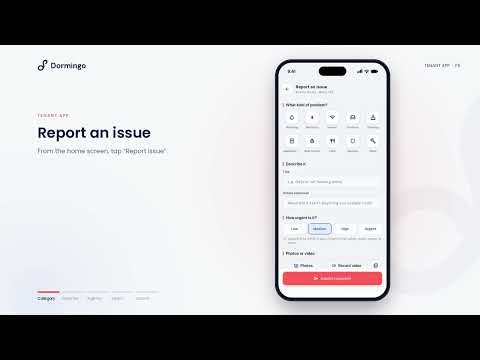
Tutorials
See it in a minute. Short videos, every part of Dormingo.
From adding your first property to how tenants pay and raise requests. Each one plays on YouTube — on a phone it opens straight in the YouTube app.
The first 100 operators to set up a property on Dormingo get six months of the full app at no cost — with no bed limit, so you can bring your whole portfolio in on day one.
Add every property and every bed — no 10-bed cap while the offer runs.
Rooms, tenants and rent — move-ins, rent periods, receipts and reminders.
Deposits, utilities and expenses — meter readings split per room, refunds tracked.
Staff and permissions — invite managers and limit them to the properties they run.
Financial reports and exports — collections, dues and expenses, ready for your accountant.
The tenant app for every resident — rent status, notices with read receipts, complaints and documents.
ID documents and maintenance — scanned IDs, repair requests and enquiries in one place.
1
Download and sign up
Get Dormingo on the App Store or Google Play and create your account with your email. No card is asked for.
2
Set up your first property
Add a property with at least one room and bed. That is the moment your spot is claimed — if one of the 100 is still open, it is yours automatically.
3
Six months start that day
The app shows the offer and your end date under My plan, with a progress bar and the days left, so it never runs out on you by surprise.
When the six months end
Everything you added stays exactly where it is. Your first 10 beds stay free forever. Beds beyond that move to the per-bed rates below — only if you choose a plan. Nothing is charged automatically, and My plan shows what your beds would cost well before the end date.
The fine print, in plain words
Open to the first 100 operators in the United States to set up a property. One offer per account; it cannot be transferred. The six months run for 180 days from the day your first property is set up. If the 100 spots are gone, you still start on the Free plan with 10 beds.
Questions about the offer? Write to support@dormingo.co — a real person answers.
Pricing
Start free. Pay by the bed.
Your first 10 beds are free forever. Paid beds are priced per bed, per month, with the rate dropping as your portfolio grows — these are the rates they will open at. Billing is not switched on yet, so nothing is charged today.
Prices are in US dollars. Paid beds are coming soon — until billing opens, every account is on the Free plan and nothing is charged. When it opens, each month is bought on its own: no lock-in, cancel any time. Running a portfolio bigger than 2,000 beds? Write to support@dormingo.co.
FAQ
Questions owners ask us
What is the founding operator offer?
The first 100 operators in the United States to set up a property get six months of Dormingo free — every feature, unlimited beds and properties, no card. It starts on the day you add your first property with a bed, and the app shows your end date under My plan. When it ends, your data stays, your first 10 beds stay free, and nothing is charged unless you choose a plan.
Is it really free for 10 beds?
Yes, permanently. The free plan is not a trial: one property, up to 10 beds, with rooms, tenants, rent, receipts, maintenance requests, enquiries and the tenant app. Beyond 10 beds you pay per bed, per month, at the rates above — once billing opens. It is not switched on yet, so nothing is charged today.
Does Dormingo hold my rent money?
Never. Tenants pay you directly — by bank transfer, Zelle, check or cash — using the details you publish in the app, then send the payment for your confirmation. Dormingo records it and issues the receipt; it takes no cut and is never the recipient.
How do tenants get the app?
Same download as yours. Open a tenant's page, tap Give app access, and share the one-time login by text or email. They set their own password on first sign-in. Remove access the day they move out.
Can my managers use it without seeing everything?
Yes. Invite staff, grant only the permissions their role needs — rent, tenants, documents, expenses and so on — and restrict them to specific properties. Owners approve every join request.
What about ID documents and tenant privacy?
ID documents are scanned on the device, stored encrypted, and only the last four digits of the number are recorded. Only staff with the documents permission can open them. Read the full Privacy Policy.
How will my bill be worked out?
By beds, not by plan. Your first 10 beds are always free; every bed after that is charged at the rate for the band it falls in, and the rate steps down as you grow. We are still finishing payments, so nothing is charged yet. When billing opens there is no lock-in — each month is bought on its own and you can stop any time.
Your building, in your pocket, by tonight.
Download Dormingo and add your first property. Be one of the first 100 operators and the next six months are on us — every bed, every feature. No card, no spreadsheet ever again.